
Stopwatch mode
A study stopwatch: focus until the work is done
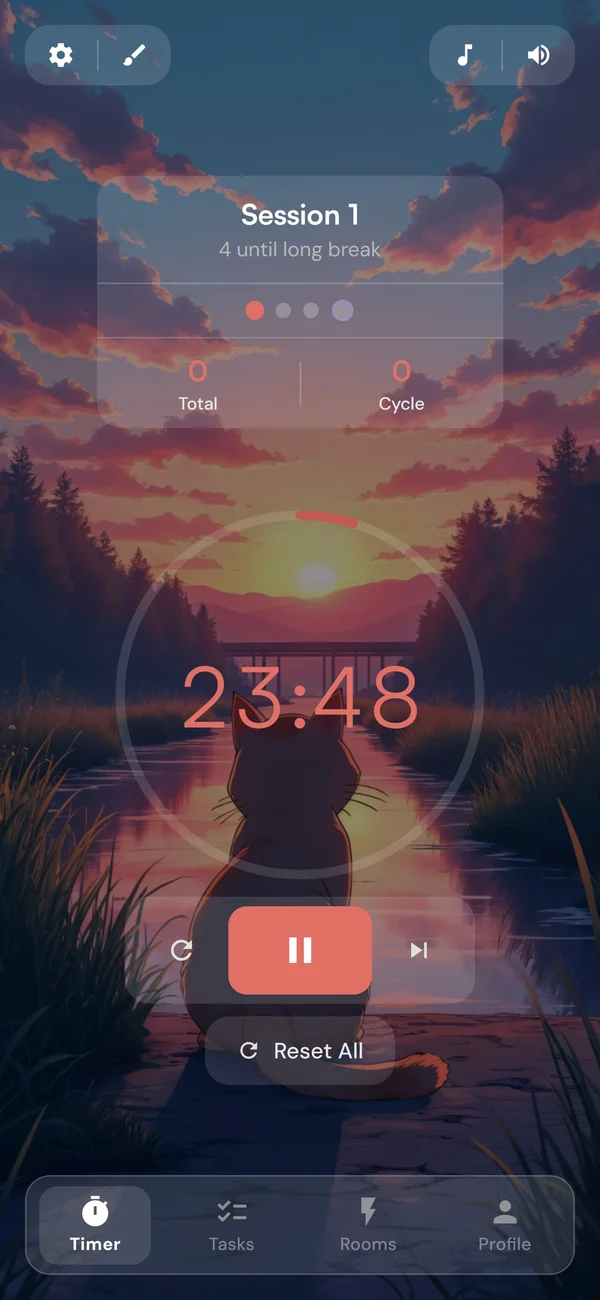
Set the timer to Stopwatch in its settings and focus counts up from zero. Hit Finish at a natural stopping point and Kaizen moves on to your break. Free on every platform, on your own or in a Focus Room where others see your time climb.
How it works
How the study stopwatch works, in four steps
1. Pick Stopwatch
Open the timer settings and choose Stopwatch under Mode. It stays set on that device until you change it.
2. Start and forget the clock
The dial counts up from 00:00. Pause whenever you need to, and pick up where you left off.
3. Finish when you are done
Hit Finish and confirm. Anything from 5 minutes up counts as a finished session.
4. Take your break
Your short or long break counts down as usual. The next focus session waits until you start it.
The ring
A goal to aim at, not a deadline
In Stopwatch mode the work length from your timer settings becomes a Focus Goal, anything from 5 to 180 minutes. The ring shows how close you are, and then simply keeps going.
On the way
The ring fills toward your Focus Goal, the work length from your timer settings.
At your goal
A quiet check-in lets you know. Keep going, or finish there. Nothing stops.
Past it
A fainter lap runs over the full ring for every further goal of focus.
Check-in
A nudge at your goal, and a safety net at 3 hours
- Goal Check-inA bell, plus a buzz on your phone, when you reach your goal, or one quiet notification if you are in another app or tab. It alerts once and keeps counting. On by default.
- Finish asks firstFinish always asks before it saves and says how many minutes you have focused, so a stray tap never ends a session.
- Saved at 3 hoursA stopwatch left running saves itself at 3 hours and moves on to your break, so a forgotten session never counts the whole night.
Breaks
Breaks you set once, not breaks you calculate
If you know the Flowtime Technique or Flowmodoro, this is where Kaizen is different. Those methods size the break from how long you focused, Flowmodoro at a fifth of it. Kaizen keeps the breaks you already set: a short break after each session, and a long break after every few. There is no math, and you know how long you will rest before you start. The trade-off is that two hours of focus earn the same break as twenty minutes. If you want the Flowmodoro ratio, set the short break to a fifth of your usual session: 10 minutes if your sessions tend to run 50.
Focus Rooms
Count up next to people counting down
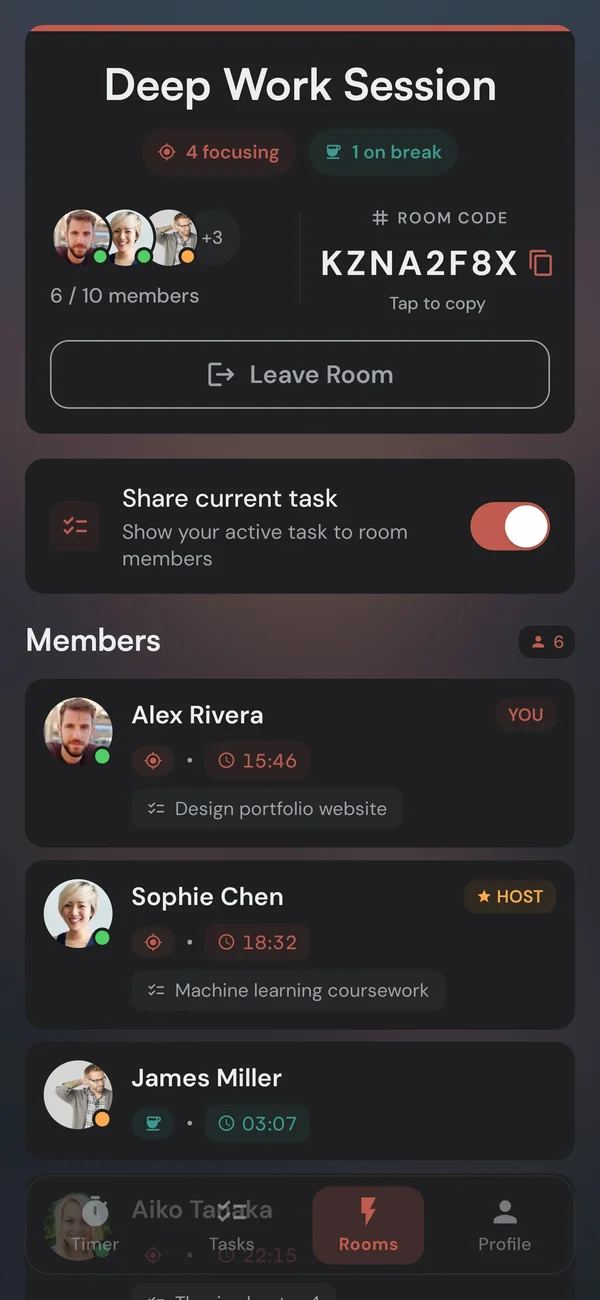
Everyone in a room runs their own timer, so nobody has to agree on a session length. The room sees you as Focusing, with your time counting up next to your name, while the person beside you works through a 25-minute Pomodoro. No camera, no microphone, and joining any room is free. It is body doubling without a fixed schedule.
Nothing is lost
Everything still counts
Tag the session
Tag a stopwatch session Study, Work, or Reading, and Focus by Tag counts every minute.
Block distracting apps
Your apps stay blocked for as long as the stopwatch runs. On Locked, Finish waits for your Focus Goal. iPhone and Android.
Other mode
When the Pomodoro timer is the better pick
Some work needs a push more than it needs room. A countdown gives you a fixed block and a bell at the end.
- When starting is the hard partA fixed 25 or 50 minutes makes a scary task small, and the bell decides when you stop, so you do not have to.
- When you tend to skip breaksA countdown ends on time whatever you are in the middle of, so the break actually happens.
- One setting awayPick Timer under Mode in the timer settings. Change it on a break and the break runs on.
Questions
The short answers
Yes, on every platform. It is part of the timer, and the whole timer is free, so nothing about it sits behind Premium.
Close, but not the same. Flowtime and Flowmodoro count focus up and then size the break from it, Flowmodoro at a fifth of the time you focused. Kaizen counts focus up the same way but keeps your breaks at the length you set. The Flowtime guide explains both methods and how to follow them by hand.
A session needs 5 minutes before Finish counts it as a finished session. End it sooner and the minutes still go into your focus time, just not as a completed session. At 3 hours the stopwatch saves the session by itself and moves on to your break, so one left running never logs a whole night.
Yes, once you finish it. A finished stopwatch session counts as one completed session, however long it ran, and its minutes count toward the task and habit you picked.
Yes. Everyone in a room runs their own timer, so you can count up while the people next to you count down. They see you as Focusing, with your time climbing instead of running down. Anyone still on an older version of the app sees Focusing without the time.
Yes, on iPhone, Android, the web, and Windows. On Android the notification counts up and has a Finish button, and in a browser the tab title shows how long you have been focusing.
No, it is saved per device, so you can run the stopwatch on your laptop and Pomodoros on your phone. Your sessions, stats, and streak sync as usual.
Breaks can start on their own after you finish, if auto-start is on for breaks. A stopwatch session always waits for you to press start.
Start a stopwatch session, free
Open Kaizen in your browser, set the timer to Stopwatch, and focus until you are done.